POS Invoice to WhatsApp
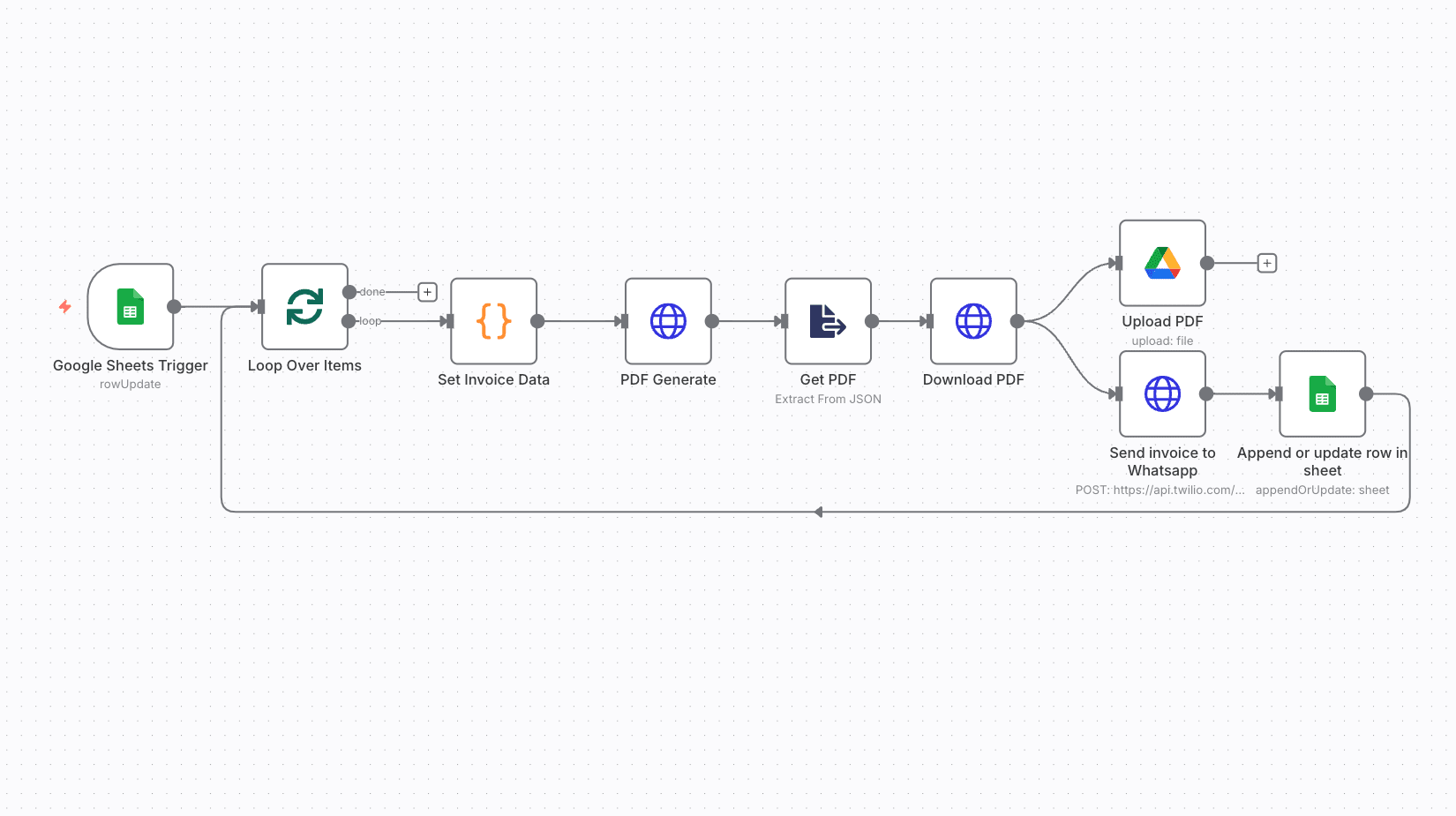
Each new POS order gets a PDF invoice, which is uploaded to Drive and sent to the customer on WhatsApp. The order status is updated in Google Sheets.
On this page
How it works
- A new order row in Google Sheets starts the workflow.
- Invoice data is prepared and a PDF is generated.
- The PDF is uploaded to Drive.
- The invoice is sent on WhatsApp and the order is marked complete.
Use cases
- Retail shops
- Restaurants
- Small businesses moving away from paper bills
What you need
This workflow connects to these apps.
- Google Sheets
- Google Drive
- n8n


You'll need an n8n instance, on n8n Cloud or self-hosted, and these credentials. Our credentials guide shows how to create each one.
- Google Drive account
- Google Sheets Trigger account
- Google Sheets account
- Twilio account

Data setup
Create these tables with these exact column names before the first run.
| Table | Columns |
|---|---|
| POS & Billing Automation → Sheet1Google Sheets | Columns are in the README. |
| POS & Billing Automation → Order DetailsGoogle Sheets | Phone NumberStatus |
Setup
- Download the JSON and import it into n8n with Import from File, or copy it and paste it onto an empty canvas. The import guide walks through both.
- Connect the credentials listed above.
- Point the Sheets, Airtable, Drive, and Slack nodes at your own files and channels.
- Replace placeholder emails, phone numbers, and form links with your own.
- Times use the America/New York timezone and dates use MM/DD/YYYY. Change them if you need to, then test and activate. The setup guide covers this step by step.
Nodes
| Node | Type |
|---|---|
| Google Sheets Trigger | googleSheetsTrigger |
| Loop Over Items | splitInBatches |
| Get PDF | extractFromFile |
| PDF Generate | httpRequest |
| Set Invoice Data | code |
| Download PDF | httpRequest |
| Upload PDF | googleDrive |
| Append or update row in sheet | googleSheets |
| Send invoice to Whatsapp | httpRequest |
Frequently asked questions
Each new POS order gets a PDF invoice, which is uploaded to Drive and sent to the customer on WhatsApp. The order status is updated in Google Sheets. It's a 10-node n8n workflow.
An n8n instance, on n8n Cloud or self-hosted, and credentials for Google Drive, Google Sheets, and Twilio. It uses only nodes that ship with n8n, so there's nothing else to install.
It works with 2 tables in Google Sheets. Create them with the column names listed under Data setup on this page before the first run.
Download the JSON, then in n8n create a new workflow, open the menu in the top right, and choose Import from File. You can also copy the JSON and paste it onto an empty canvas.
Yes. It's free to download, import, and change, with no sign-up. You only pay for the apps it connects to, where those aren't free on your plan.