Dairy Milk Collection & Quality Pricing
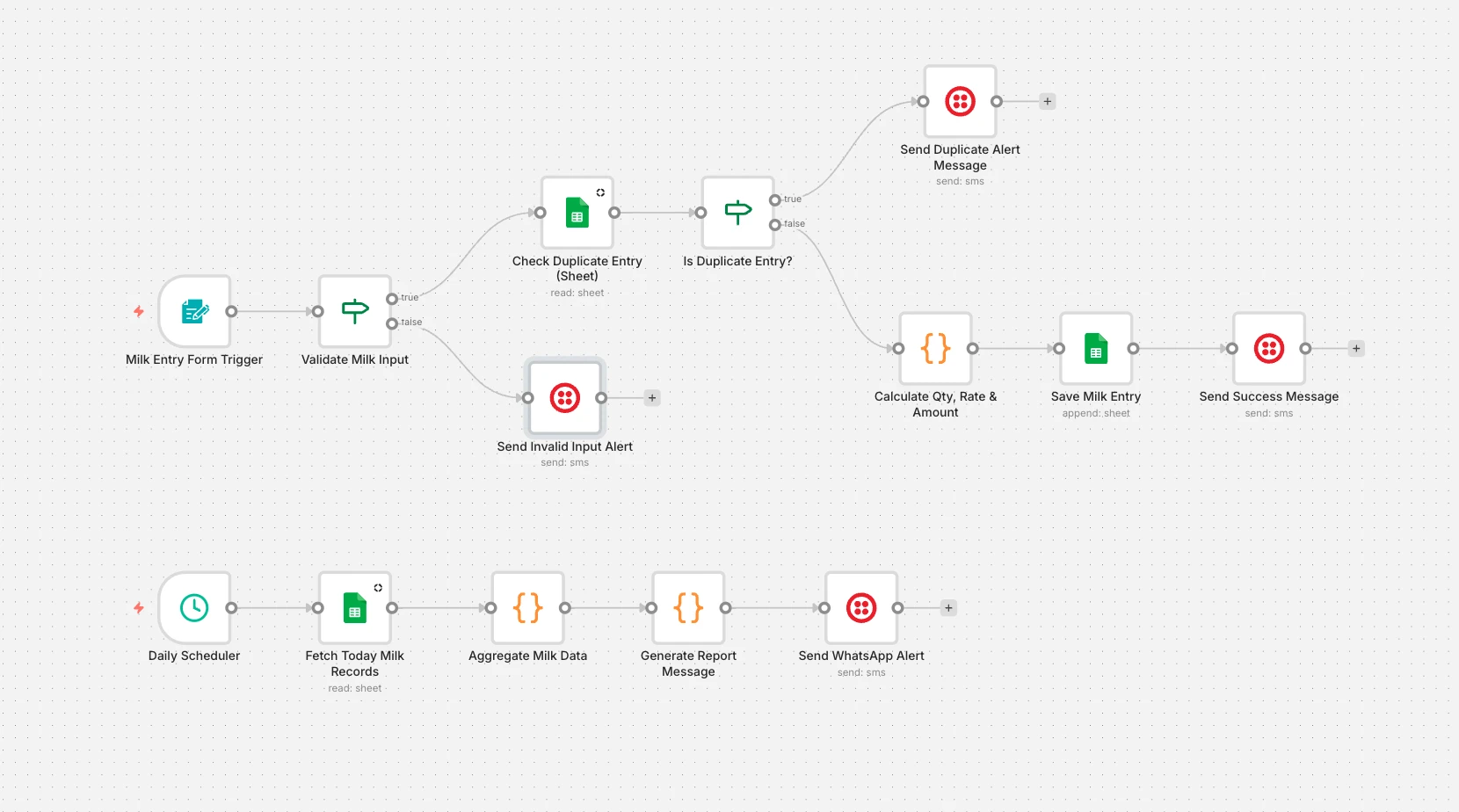
Records daily milk collection, calculates the rate from fat and SNF quality, blocks duplicate entries and sends a WhatsApp receipt. A daily summary report goes out automatically.
On this page
How it works
- A form captures the farmer, quantity and quality readings.
- Input is validated and checked against today's entries for duplicates.
- Rate and amount are calculated from quality and the entry is saved.
- The farmer gets a WhatsApp confirmation, or an alert if there's a problem.
- Each day, totals are aggregated and a report is sent on WhatsApp.
Use cases
- Milk collection centers
- Dairy cooperatives
- Private dairies
What you need
This workflow connects to these apps.
- HTTP
- Google Sheets
- n8n


You'll need an n8n instance, on n8n Cloud or self-hosted, and these credentials. Our credentials guide shows how to create each one.
- Google Sheets account
- Twilio account

Data setup
Create these tables with these exact column names before the first run.
| Table | Columns |
|---|---|
| Milk Collection Sheet → Sheet1Google Sheets | Farmer NameCollection DateSessionFarmer IDMobile NumberMilk QuantityFat (%)SNF (%)Collection CenterOperator NameRemarksQualityRateAmountCreated At |
Setup
- Download the JSON and import it into n8n with Import from File, or copy it and paste it onto an empty canvas. The import guide walks through both.
- Connect the credentials listed above.
- Point the Sheets, Airtable, Drive, and Slack nodes at your own files and channels.
- Replace placeholder emails, phone numbers, and form links with your own.
- Times use the America/New York timezone and dates use MM/DD/YYYY. Change them if you need to, then test and activate. The setup guide covers this step by step.
Nodes
| Node | Type |
|---|---|
| Milk Entry Form Trigger | formTrigger |
| Validate Milk Input | if |
| Check Duplicate Entry (Sheet) | googleSheets |
| Is Duplicate Entry? | if |
| Send Duplicate Alert Message | twilio |
| Save Milk Entry | googleSheets |
| Send Success Message | twilio |
| Daily Scheduler | scheduleTrigger |
| Aggregate Milk Data | code |
| Generate Report Message | code |
| Send WhatsApp Alert | twilio |
| Send Invalid Input Alert | twilio |
| Calculate Qty, Rate & Amount | code |
| Fetch Today Milk Records | googleSheets |
Frequently asked questions
Records daily milk collection, calculates the rate from fat and SNF quality, blocks duplicate entries and sends a WhatsApp receipt. A daily summary report goes out automatically. It's a 17-node n8n workflow.
An n8n instance, on n8n Cloud or self-hosted, and credentials for Google Sheets and Twilio. It uses only nodes that ship with n8n, so there's nothing else to install.
It works with 1 table in Google Sheets. Create it with the column names listed under Data setup on this page before the first run.
Download the JSON, then in n8n create a new workflow, open the menu in the top right, and choose Import from File. You can also copy the JSON and paste it onto an empty canvas.
Yes. It's free to download, import, and change, with no sign-up. You only pay for the apps it connects to, where those aren't free on your plan.